
Start with one page
The page selector and document outline help you find the content you want to change.
YOUR SITE. YOUR NEXT MOVE.
Import the static HTML export you already own. Change content in a protected workspace, review each build, and export with your original files untouched.
Confirm your email to start a 14-day trial. No payment details required.
THE ACTUAL EDITOR
A real look at the editor, using a demonstration website. Choose a page, edit a supported element and review the preview before saving.
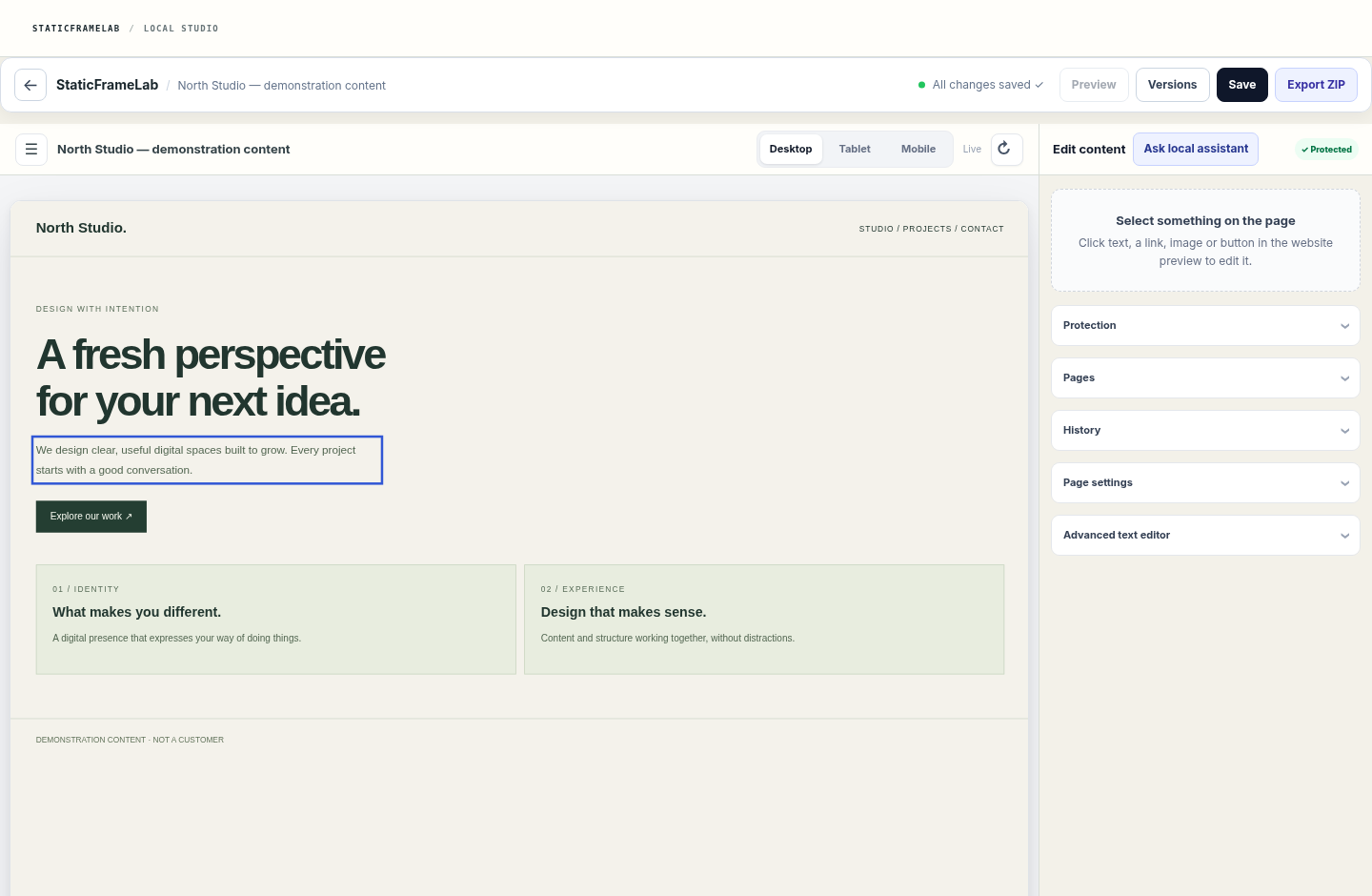
The page selector and document outline help you find the content you want to change.
Update supported text, links and images. The preview lets you check the result without replacing the imported source.
Save a version, inspect its history and export its files. AI suggestions require your review; they do not publish themselves.
01 / HOW IT WORKS
A website generated elsewhere can become a site you can maintain. StaticFrameLab works with exportable static files and checks each import before enabling protected edits.
Upload a ZIP with HTML, CSS, JavaScript and assets. The import checks the archive and maps the pages it can understand.
ZIP → SOURCEEdit supported content and create pages using compatible designs. Design Lock checks structure before a change becomes a build.
SOURCE → DRAFTInspect the result and its history, then export the build. Your imported source remains available as the original reference.
DRAFT → EXPORTLOCAL AI. HUMAN APPROVAL.
Select a code fragment and ask the local assistant to explain it or propose a focused replacement. Review the suggestion, apply it to the draft and save only when you are ready.
How the assistant works ↗<section class="hero">
− <h1>Your website</h1>
+ <h1>Your next version</h1>
</section>02 / WHAT YOU GET
Keep the visual work you already did. Add a calmer way to make the next content change.
Open your workspaceImported files are kept separate from generated builds, so editing does not overwrite the original.
Change supported content while structural checks protect the design and flag unsafe edits.
Review versions and preview changes before deciding which build to keep or export.
Export the generated website files for your own publishing workflow.
03 / THE RIGHT FIT
Bring a static site made with an AI builder, a template, or your own code. If you have the HTML, styles, scripts and assets, StaticFrameLab can analyze what is safe to edit.
Some complex scripts, hosted builders and proprietary exports need manual preparation. Import analysis shows what the editor can support.
04 / PLAN PREVIEW
Start with a 14-day trial after confirming your email. No card or automatic paid conversion. Monthly USD plans require a separate PayPal subscription and verified payment.
For one site owner or independent operator.
For a small team managing several websites.
For agencies and multi-site operators.
One project, one person and 1 GB during the trial. It starts only after email confirmation. A paid subscription requires your separate approval in PayPal.
Explore the trial ↗05 / QUESTIONS, ANSWERED
Clear answers before you hand a website to a new tool.
Ask another questionIt is designed for exportable static HTML sites with their CSS, JavaScript and assets. Compatibility depends on the actual files; hosted or dynamic apps may need manual work.
No. StaticFrameLab keeps the imported source separate and prepares independent builds for your changes.
Yes. You can review a generated build and download its files for your own hosting or publishing workflow.
Email confirmation starts a 14-day trial with one project and one seat. It ends without a charge; existing projects remain exportable for 30 days. A paid plan requires a separate PayPal subscription and verified payment. The plan page shows whether checkout is available.
PRODUCT FACTS, NOT PROMISES
StaticFrameLab is an editing workspace for exported static websites, not a replacement for your web host or a converter for every dynamic application. Compatibility is checked against the files you import.
The assistant runs on the application server. It receives the selected fragment, not unrestricted access to your files. Responses are suggestions and can be wrong; review code before saving.
No ranking, traffic, revenue or universal compatibility is guaranteed. The original import stays separate from generated builds.
Product information maintained by StaticFrameLab. Reviewed October 2, 2026.NEXT CHANGE, BETTER CONTROL
Create a workspace to explore the editor, or ask us about compatibility before importing.
StaticFrameLab helps maintain exportable static websites. Review plan limits and policies before creating a workspace. Read the terms.